


SBI ATM Withdrawal Limit Per Day
SBI offers various ATM withdrawal limits based on the type of debit card held by users, providing a convenient way to manage cash needs. Most SBI debit cards have a daily withdrawal limit of Rs.40,000, while international debit cards can reach up to Rs.1,00,000.

While there are no specific monthly withdrawal limits, it is important for users to adhere to daily limits to ensure smooth banking transactions. Most debit cards come with a daily cap, and users can make a certain number of free transactions at non-bank ATMs each month. After exceeding this limit, a fee may be applied for additional transactions.
SBI ATM Daily and Monthly Withdrawal Limits
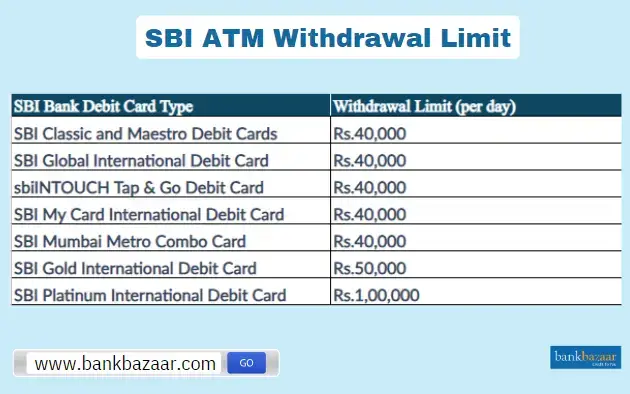

- Daily Withdrawal Limits:
- SBI sets specific daily withdrawal limits based on the type of debit card you use. For most SBI debit cards, the daily withdrawal limit is Rs.40,000. However, certain international debit cards offer higher limits, with some reaching up to Rs.1,00,000.
- SBI sets specific daily withdrawal limits based on the type of debit card you use. For most SBI debit cards, the daily withdrawal limit is Rs.40,000. However, certain international debit cards offer higher limits, with some reaching up to Rs.1,00,000.
Here is the table showing the withdrawal limits for various SBI debit cards:
Card Type | Withdrawal Limit |
SBI Classic and Maestro Debit Cards | Rs.40,000 |
SBI Mumbai Metro Combo Card | Rs.40,000 |
sbiINTOUCH Tap & Go Debit Card | Rs.40,000 |
SBI My Card International Debit Card | Rs.40,000 |
SBI Global International Debit Card | Rs.40,000 |
SBI Gold International Debit Card | Rs.50,000 |
SBI Platinum International Debit Card | Rs.1,00,000 |
SBI ATM Withdrawal Limit Per Day | Rs.2,00,000 |
- Monthly Withdrawal Limits:
- SBI does not impose a specific monthly withdrawal limit for ATM transactions. However, it is important to adhere to the daily limits to ensure seamless transactions.
- For withdrawals made from non-SBI ATMs, customers are allowed five free transactions per month. After these five transactions, a charge of Rs.20 + GST will apply to each subsequent transaction. This limit applies to both cash and non-cash transactions.
- While SBI does not specify a monthly limit for withdrawals from its own ATMs, exceeding free non-SBI ATM transactions will incur additional charges.
The table below provides a clear overview of the minimum and maximum ATM withdrawal limits for different SBI debit cards:
Debit Card Type | Minimum Withdrawal Limit (per day) | Maximum Withdrawal Limt (per day) |
SBI Rupay Debit Card | Rs.100 | Rs.40,000 |
SBI Visa Debit Card (Domestic) | Rs.100 | Rs.40,000 |
SBI Visa Debit Card (International) | Rs.100 | Rs.1,00,000 |
SBI Classic Mastercard | Rs.100 | Rs.25,000 |
SBI Platinum Mastercard | Rs.100 | Rs.75,000 |
SBI Business Platinum Mastercard | Rs.100 | Rs.1,00,000 |
SBI Global Debit Card | Rs.100 | Rs.40,000 |
SBI ATM Withdrawal Limits Based on Card Type
SBI has established specific withdrawal limits for its debit cards, which vary according to the card type. Understanding these limits can help users manage their finances more effectively and ensure they have access to the cash they need.
- SBI Visa Debit Cards: SBI allows a daily withdrawal of Rs.40,000 on regular Visa debit cards and up to Rs.1,00,000 on international Visa cards. You can increase or change these limits anytime via the SBI Yono app by submitting a request.
- SBI Mastercard Debit Cards: Classic Mastercard holders can withdraw up to Rs.25,000 daily, which suits those with more modest cash needs. For those requiring higher access, Platinum Mastercard users can withdraw up to Rs.75,000 per day. The Business Platinum Mastercard takes it a step further, allowing withdrawals of up to Rs.1,00,000 per day.
- undefined
- SBI Global Debit Card: With this SBI debit card, you can withdraw cash at ATMs both in India and abroad. For domestic withdrawals, the limit is between Rs.100 and Rs.40,000 per day, while international limits vary by country but cannot exceed Rs.40,000.
SBI Rupay Debit Cards: This RuPay Debit Cards have a daily withdrawal limit of Rs.40,000, aligning with the domestic limit for Visa cards. This makes it a reliable option for everyday transactions. Additionally, the IOCL Co-Branded Contactless RuPay Debit Card also supports this limit, providing users with a seamless and flexible way to access cash.
SBI ATM Withdrawal Process with and without OTP
SBI has implemented a robust One-Time Password (OTP) system to enhance the security of ATM transactions. This additional layer of protection is designed to safeguard your financial information and ensure that only authorised users can access their accounts.
Withdrawal Process Without OTP
For cash withdrawals of up to Rs.10,000, SBI customers can complete their transactions without needing to enter a One-Time Password (OTP). This feature allows for quick and convenient transactions, making it particularly beneficial for users who require smaller amounts of cash.
Withdrawal Process With OTP
You can withdraw cash from an SBI ATM using an OTP by following the steps outlined below:
- Step 1: Visit an SBI ATM and insert your debit card into the card slot.
- Step 2: Select the amount you wish to withdraw. If the amount exceeds Rs.10,000, proceed to the next step.
- Step 3: Wait for the One-Time Password (OTP) to be sent to your registered mobile number.
- Step 4: Once you receive the OTP, enter it on the ATM screen when prompted.
- Step 5: After entering the correct OTP, your identity will be verified, and you can continue with the transaction.
- Step 6: Complete the withdrawal by collecting your cash, which will be dispensed by the ATM.
- Step 7: Ensure you take your debit card and any transaction receipt before leaving the ATM.
How to Check Your SBI ATM Withdrawal Limit?
Using SBI Yono Mobile App
You can check your SBI ATM withdrawal limit by following the steps given below:
- Step 1: Download it from the Google Play Store or Apple App Store.
- Step 2: Open the app and log in using your username and password or the MPIN (if already set).
- Step 3: Tap on the menu or the options section, typically at the bottom or the side of the screen.
- Step 4: Select the 'Service Requests' option or 'ATM Card Services', depending on the app's layout.
- Step 5: Look for the option that allows you to manage your debit card limits, such as 'Manage Card Limits' or 'Set ATM Limits'.
- Step 6: Check or Adjust Your Withdrawal Limit. You can also adjust the limit within the permitted range as per your preferences.
- Step 7: If you adjust the limit, make sure to confirm and save the changes.
Visiting Your Nearest SBI Branch
You can change your SBI ATM withdrawal limit offline by following the instructions given below:
- Step 1: Locate the Nearest SBI Branch:
- Step 2: Visit your nearest State Bank of India branch during working hours.
- Step 3: Carry Necessary Identification: Bring your debit card and valid ID proof (e.g., Aadhaar card, PAN card) for verification.
- Step 4: Consult with the Bank Representative. Approach the help desk or a bank official and request details regarding your ATM withdrawal limit.
- Step 5: If you wish to change your limit, you may need to fill out a request form. The bank staff will assist you with the process.
- Step 6: After submitting your request, confirm the new withdrawal limit and any other necessary steps, if applicable.
Contacting SBI Customer Care
The steps below can help you change the SBI ATM withdrawal limits by calling customer care.
- Step 1: Call the Toll-Free Number 1800-425-3800 to reach SBI customer care.
- Step 2: Follow the interactive voice response (IVR) system to connect to an executive.
- Step 3: Once connected, ask the representative for information regarding your current ATM withdrawal limit.
- Step 4: If you want to modify your withdrawal limit, they will guide you through the process, which may involve using the app or visiting the branch.
Emailing SBI Support
The instructions given below can help you set your ATM withdrawal limit via email:
- Step 1: Send an email to sbi.bank.in/contact-centre
- Step 2: Mention your account number, full name, registered mobile number, and your query regarding the ATM withdrawal limit.
- Step 3: SBI’s customer care team will respond with the required information and guidance.
How to Change SBI ATM Withdrawal Limit
By the following methods, you can change your SBI ATM withdrawal limit:
Using SBI YONO Mobile App
The process to change your SBI ATM withdrawal limit using the SBI YONO mobile App is outlined below:
- Step 1: Download the SBI YONO App.
- Step 2: Log in to Your Account:
- Step 3: Open the app and log in using your credentials (username/password or MPIN).
- Step 4: Tap the menu button or explore the options, usually at the bottom of the screen.
- Step 5: Navigate to 'Service Requests'.
- Step 6: Choose 'Manage Card Limits'
- Step 7: Enter the New Withdrawal Limit.
- Step 8: Save the changes and confirm with an OTP (One-Time Password) sent to your registered mobile number.
Using SBI Internet Banking
The following steps will guide you to change your ATM withdrawal limits via SBI Internet Banking:
- Step 1: Log in to SBI Internet Banking. Visit onlinesbi. and log in using your credentials.
- Step 2: From the main menu, choose the 'e-Services' option.
- Step 3: Go to 'ATM Card Services':
- Step 4: Choose 'Manage ATM Card Limits'. Select the option to modify your withdrawal limit.
- Step 5: Set the new limit as per your preference.
- Step 6: Confirm the changes with OTP authentication and complete the process.
Visiting the Nearest SBI Branch
You can change your ATM withdrawal limits offline by following the instructions given below:
- Step 1: Visit the Nearest SBI Branch:
- Step 2: Request to Change the ATM Limit:
- Step 3: Inform the bank representative that you would like to change your ATM withdrawal limit.
- Step 4: The representative may provide a form to change the limit, which you can fill in and submit.
- Step 5: Once the request is processed, confirm that the new limit is applied.
Contacting SBI Customer Care
You can change your ATM withdrawal limit by calling SBI customer care. The steps are as follows:
- Step 1: Dial 1800-425-3800 to reach SBI customer care.
- Step 2: Follow the prompts to speak with a customer care representative.
- Step 3: Request to Change Withdrawal Limit. Provide the necessary details and request them to change your ATM withdrawal limit. The representative will guide you through any additional steps needed to complete the process.
How To Withdraw Cash from an SBI ATM?
Here is a stepwise guide on how to withdraw cash from an SBI ATM:
- Step 1: Place your SBI debit card into the ATM machine's card slot.
- Step 2: Select your preferred language from the options on the screen.
- Step 3: Click on the ‘Cash Withdrawal’ option displayed on the screen.
- Step 4: Choose the type of account linked to your card (Savings, Current, etc.).
- Step 5: Input the amount of cash you wish to withdraw.
- Step 6: Enter your 4-digit ATM PIN to authorise the transaction.
- Step 7: Retrieve your cash and take out your card once the transaction is complete.
FAQs on SBI ATM Withdrawal Limit
1.Can I withdraw Rs.40,000 from the SBI ATM at once?
Yes, you can withdraw Rs.40,000 at a time from an SBI ATM if you possess an international debit card, as long as you haven't surpassed your daily withdrawal limit.
2.Can I withdraw Rs.50,000 from the SBI ATM in a single day?
Yes, customers with the SBI Gold International Debit Card can withdraw up to Rs.50,000 in a day, which is a higher limit compared to standard debit cards.
3.Do premium SBI debit cards provide higher withdrawal limits?
Yes, premium SBI debit cards, like the Platinum International Debit Card, allow for higher daily withdrawal limits compared to standard options.
4.Are there specific withdrawal limits for senior citizens using SBI debit cards?
No, SBI does not provide special withdrawal limits for senior citizens; the limits are uniform for all customers and depend on the debit card type they possess.
5.Do the withdrawal limits at SBI ATMs apply to international transactions as well?
Yes, the withdrawal limits for SBI debit cards apply to both domestic and international transactions, although they may differ by country.
6.How can I check my ATM withdrawal limit?
You can verify your withdrawal limit using the SBI Yono mobile app or by visiting your local SBI branch. You can also adjust the limit based on your requirements.
7.How many free ATM transactions do I get at SBI each month?
As an SBI account holder, you are eligible for five free ATM transactions per month at SBI ATMs. Additional transactions will incur extra charges.

Karishma VP has over a decade of experience in content writing which includes over five years specializing in personal finance. Her career in BankBazaar has given her the opportunity to write on a wide variety of financial products ranging from credit cards and home loans to insurance policies and government schemes. She believes that an understanding of personal finance is an important step to leading an independent, empowered life. This has led to her being passionate about learning more about the BFSI sector and writing about personal finance as clearly, concisely, and accurately as possible to make it accessible to a larger audience through BankBazaar.

Disclaimer
Credit Card:
Credit Score:
Personal Loan:
Home Loan:
Fixed Deposit:


Copyright © 2026 BankBazaar.com.