


How to Check Aadhaar Update Status After Update Request Submitted
You can check your Aadhaar update status after submitting an update request by entering your EID, SRN, URN or SID on the UIDAI myAadhaar portal, or by calling the UIDAI helpline. Aadhaar is a unique 12-digit identification code issued by the Unique Identification Authority of India (UIDAI) to every legal resident of India.
Enrolment for Aadhaar is free and available to all, from newborns to senior citizens. It's essential to keep your Aadhaar card updated, especially with changes to your address, mobile number, or other key information for verification purposes.
Your Aadhaar details can be updated in two main categories: demographic and biometric. Demographic information includes your name, address, date of birth, gender, mobile number, and email, while biometric details refer to fingerprints, iris scans, and photographs.
To update information like address you have the option to do so online or in person at an Aadhaar Seva Kendra. However, name, date of birth and gender updates, as well as any other changes, such as biometric updates, must be done in person at an Aadhaar Seva Kendra.
Once you've submitted an update request, you can easily check whether the changes have been processed. This can be done either online or by calling the UIDAI toll-free number.
How to Check Aadhaar Update Status Online with Your Enrolment ID?
If you have placed an update request at an Enrolment Centre or Update Centre, then you will need your Enrolment ID (or EID) to track your Aadhaar card status.
EID consists of 28 digits: the 14-digit enrolment number, and the 14-digit date & time stamp. It is located at the top of the update acknowledgement slip you get from the Enrolment or Update Centre after you have submitted your request for change in Aadhaar details. It may look something like this:
1234/12345/12345 dd/mm/yyyy hh:mm:ss
Once you find your updated acknowledgment slip and the EID, follow these steps:
Step 1 - Go to the official website of UIDAI and open the Check Enrolment / Update Status service.
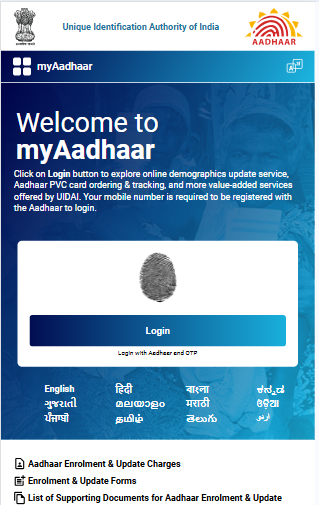
Step 2 - Enter the EID and captcha details and click on 'Check Status'.
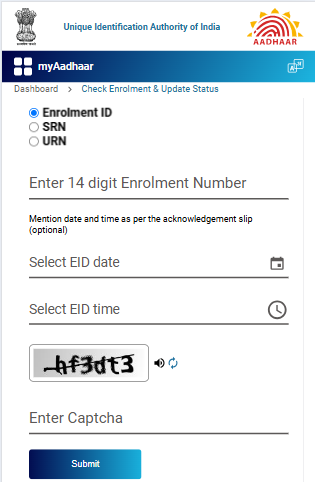
Step 3 - On the following screen, you will get a status message that reads, "Your Aadhaar is generated," if your Aadhaar is prepared. On this screen, you may download or obtain an Aadhaar for your mobile device.
Step 4 - You won't see the above notification if your requested updates are not added to the database.
UIDAI normally completes 90% of update requests within 30 days, although some requests can take up to 90 days depending on the type of update and the verification involved.
Every update request is subject to verification and validation by UIDAI, so a request can be accepted or rejected, for example when the supporting document is invalid. If your request is rejected, or has been pending for more than 30 days, you can file a complaint using your EID, URN or SRN on the myAadhaar grievance portal, call the UIDAI helpline 1947 or email help@uidai.gov.in.
Once your Aadhaar is generated, you can download your updated e-Aadhaar from the Download Aadhaar service on the myAadhaar portal using an OTP sent to your registered mobile number.
Check - Pan Card Status
How to Check Aadhaar Status Online If You Do Not have EID?
If you don't have your EID, you can get it through Retrieve Aadhaar number/EID/SID service on the UIDAI myAadhaar portal using your registered cellphone number or email address. On the same page, you can also retrieve your Aadhaar number if you misplaced it or forgot it.
Step 1 - Select the Enrolment ID/SID option, provide your name as per Aadhaar, date of birth, and mobile number or email id, and enter the Captcha code.
Step 2 - After you input the details, click on 'Send OTP'.
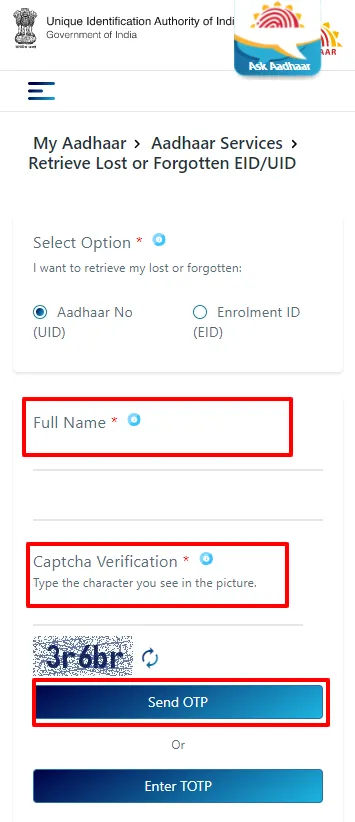
Step 3 - You will be taken to another page where you can put in the OTP and click on 'Login'.
Step 4 - You will receive your EID or Aadhaar number on your mobile phone via SMS.
Step 5 - Proceed to the UIDAI My Aadhaar portal to check the status using the retrieved EID.
How to Check Update Status Online Using Service Request Number (SRN)
If you have placed an update request online with UIDAI, you can track it by using your Service Request Number (SRN).
Step 1 - Go to the Check Enrolment / Update Status page of the UIDAI myAadhaar portal.
Step 2 - In the space provided there, input the SRN, which is 'S' followed by 13 digits and is printed on your acknowledgement slip.
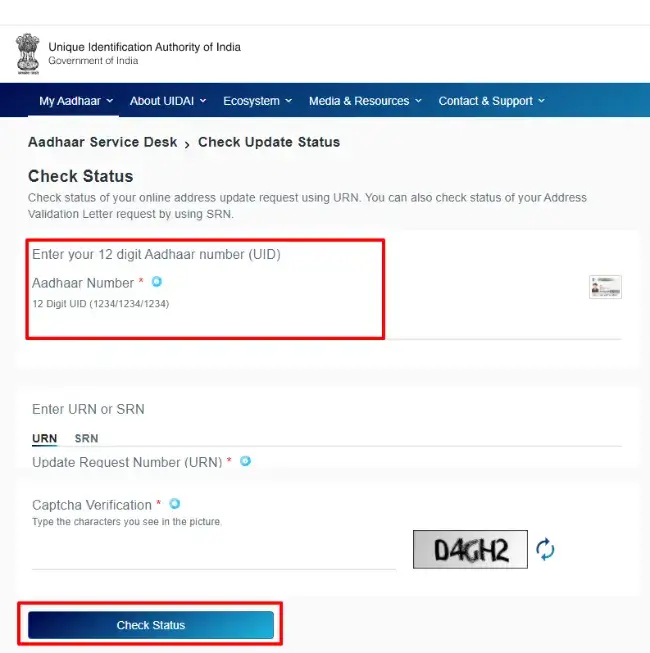
Step 3 - Do the Captcha verification.
Step 4 - The next screen will show you whether the change has been made in the database or not.
How to Track Aadhaar Update Status Using URN
You would have gotten a Service Request Number if you had asked for an Address Validation Letter (SRN).
The only difference between the processes for URN and SRN is that you must enter the SRN, which is 'S' followed by 13 digits, and the Captcha code on the Check Enrolment / Update Status page of the UIDAI myAadhaar portal.
To check the Aadhaar change status using this, do the following:
Step 1 - Visit Official website UIDAI Portal
Step 2 - Click on 'Check Enrolment / Update Status'
Step 3 - Enter the URN.
Step 4 - Enter the correct Captcha.
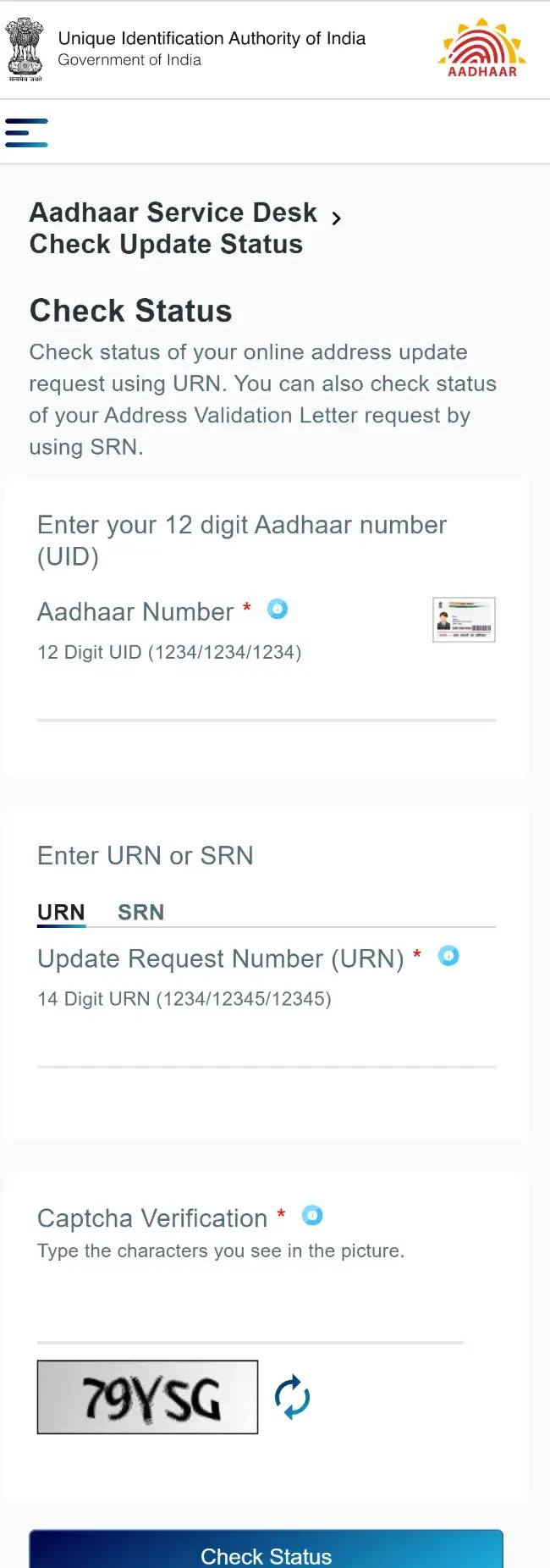
Step 5 - The next screen will show you whether the change you requested is done or not.
Track Aadhaar Address Validation Letter Status Using SRN
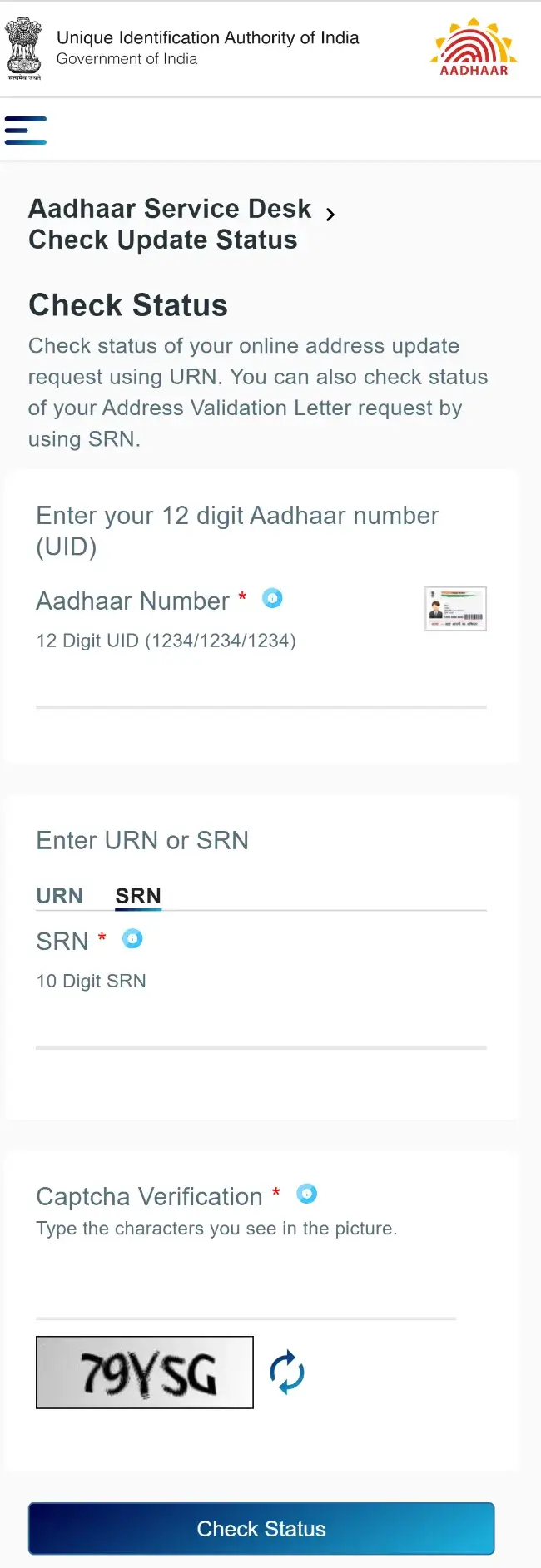
If you had requested for an Address Validation Letter, then you would have received a Service Request Number (SRN).
The steps are similar to the one for URN - the only difference is that you'll input the SRN, which is 'S' followed by 13 digits, along with the Captcha code on the Check Enrolment / Update Status page of the UIDAI myAadhaar portal.
How to Check Aadhaar Status via Phone Call?
You can call UIDAI's toll-free number 1947 to check the status of your updates if you do not have access to the internet.
When you call 1947, you will be taken to the IVR. You have to follow the steps given below to track your Aadhaar address change request:
Step 1 - Dial 1947 from your registered mobile number.
Dial 1947 using your registered mobile number and press 1 to know your Aadhaar enrolment, update or PVC card order status.
Step 2 - Choose the status you want to check.
Follow the instructions and press 1 to know your Aadhaar update status, 2 to know your enrolment status, 3 for PVC card status and 4 to find out your Aadhaar appointment status.
Step 3 - Provide the details asked for.
Provide the necessary details, such as your Update Request Number (URN), enrolment number or Service Request Number (SRN), to know the relevant Aadhaar status.
For any further queries, you can talk to a UIDAI representative or write to help@uidai.gov.in.
How to Check Aadhaar Card Status via SMS?
At present, it is not possible to check your Aadhaar status via SMS.
How to Check Aadhaar Card Update Status via Post?
Currently, it is not possible to check your Aadhaar update status via post.
PO Box 1947 GPO Bangalore – 560001.
How to Check Aadhaar Card Status via Email?
You can send your query to the email ID help@uidai.gov.in. You can also send a mail to the email ID to check the status of your Aadhaar.
How to Check Aadhar Update Status by Visiting Aadhaar Enrolment Centre?
To check your Aadhaar update status by visiting an Aadhaar Enrolment Center, follow these steps:
Step 1: Start by locating an Aadhaar Enrolment Center near you. Visit the official UIDAI website and select the 'Seva Kendra Locator' option.
Step 2: Bring your Aadhaar details and any relevant documents to the Enrolment Center.
Step 3: Provide your Aadhaar number along with any Update Request Number (URN) or Enrolment ID (EID) you have.
Step 4: The officials at the centre will use this information to verify your Aadhaar update status in their system and inform you of the current progress.
Aadhaar Resources
- Unique Identification Authority of India
- Aadhar Card Download
- Aadhar Card Status Update
- Aadhar Card Update
- Documents Required for Aadhar
- Link Aadhaar With Mobile
- Aadhar Password
- Register Mobile Number with Aadhaar
- Aadhar Card Correction Form
- Aadhar Enrolment Centers
- Aadhar Customer Care Numbers
- Check Aadhar Status
- Aadhar Verification
- Lost Aadhar Card
- Aadhar Card Online Registration
Summary
You can check your Aadhaar update status after submitting an update request using your EID, SRN, URN or SID on the UIDAI myAadhaar portal, by calling the UIDAI helpline, or by visiting an Aadhaar Enrolment Centre. Keep your acknowledgement slip handy, because the number printed on it decides which option you use. If your Aadhaar update request is rejected or stays pending for long, you can raise a complaint with UIDAI using the same number.
Disclaimer
FAQs on Aadhaar Update Status Tracking
1.How much time does it take for address to get updated in the Aadhaar database?
The time an Aadhaar address update takes depends on the type of update and the verification UIDAI needs to carry out. UIDAI normally completes most Aadhaar update requests within the timeline given in the section above, and you can track your Aadhaar update status until the update shows in the database.
2.Will I get a new Aadhaar card if my address is updated?
Yes, UIDAI sends an updated Aadhaar letter to the address recorded in your Aadhaar when you update your name, address, date of birth or gender. No letter is sent for a mobile number or email update, and your Aadhaar number stays the same after any update.
3.Can my address change request be rejected?
Yes, an Aadhaar address change request can be rejected, because every Aadhaar update request is subject to verification and validation by UIDAI before it is accepted or rejected. A common reason is an invalid supporting document, so check the document requirements before you submit your request. If your Aadhaar update request is rejected, you can raise a complaint on the myAadhaar grievance portal, call the UIDAI helpline or email UIDAI with your update request details.
4.Can I download my updated Aadhaar card?
Yes, you can download your updated Aadhaar card as an e-Aadhaar from the Download Aadhaar service on the UIDAI myAadhaar portal once your Aadhaar is generated after the update. You will need your registered mobile number to receive the OTP for the Aadhaar download.
5.Can Aadhaar card be updated in 2 days?
No, an Aadhaar update cannot be completed in two days, because every Aadhaar update request goes through UIDAI verification and validation first. The expected Aadhaar update timeline is given in the section above.
6.Will my Aadhaar number change after an Aadhaar update request is processed?
No, your Aadhaar number stays the same after an Aadhaar update request is processed. Only the details you updated change, and you can check your Aadhaar update status using the options given above.
7.What if I don't receive an update on my Aadhaar Update Status via email?
If you do not receive an email about your Aadhaar update status, you can check the status yourself using the options given above, such as the UIDAI myAadhaar portal or the UIDAI helpline. You can also visit the nearest Aadhaar Enrolment Centre for help with your Aadhaar update request.
8.How long does it take for changes to appear after submitting an Aadhaar update request?
Changes appear in your Aadhaar information once UIDAI has verified and processed your Aadhaar update request, and the time taken depends on the type of update. You can check your Aadhaar update status regularly on the UIDAI myAadhaar portal or through the other options given above.
9.Can I use my mobile number to check my Aadhaar Update Status?
No, you cannot check your Aadhaar update status with a mobile number alone, because the status check needs the EID, SRN, URN or SID printed on your acknowledgement slip. Your registered mobile number is used to receive the OTP when you retrieve a lost EID or SID, which you can then use to check your Aadhaar update status.
10.What documents do I need for an Aadhaar Card information update?
You need valid proof of identity and proof of address documents from UIDAI's list of supporting documents to update your Aadhaar information. For an online Aadhaar address update, only a proof of address document is required, and the list of accepted documents is displayed at Aadhaar Enrolment Centres and on the UIDAI website.
11.How can I verify my Aadhaar Update Status after submitting it to an enrolment centre?
After you submit an Aadhaar update at an Enrolment Centre, you can check your Aadhaar update status using the EID or URN on your acknowledgement slip on the UIDAI myAadhaar portal. You can also call the UIDAI helpline or revisit the Enrolment Centre.
12.What should I do if my Aadhaar Update Status shows 'rejected'?
If your Aadhaar update status shows 'rejected', review the reason for rejection, correct the issue, such as an invalid supporting document, and submit a fresh Aadhaar update request. You can also raise a complaint on the myAadhaar grievance portal or contact the UIDAI helpline if you think the rejection is incorrect.
13.Can I still check my Aadhaar Update Status if I lost my Enrolment ID?
Yes, you can retrieve your lost Enrolment ID using the Retrieve Aadhaar number/EID/SID service on the UIDAI myAadhaar portal. Enter your name as per Aadhaar, date of birth, and registered mobile number or email address, verify the OTP, and then use the retrieved EID to check your Aadhaar update status online.
14.What if I have yet to receive an update after a long time?
If your Aadhaar update is pending for longer than the usual timeline, you can file a complaint using your EID, URN or SRN on the myAadhaar grievance portal. You can also contact the UIDAI helpline or visit the nearest Aadhaar Enrolment Centre for help with your Aadhaar update status.
15.Is there a fee for checking the Aadhaar Update Status?
No, the Check Enrolment / Update Status service on the UIDAI myAadhaar portal is free of charge for checking your Aadhaar update status. Fees apply only to specific Aadhaar update services, and the applicable charges are displayed at the Enrolment Centre and on the acknowledgement slip.
16.Can I update Aadhaar details if my mobile number isn't registered with Aadhaar?
If your mobile number is not registered with Aadhaar, you need to visit an Aadhaar Enrolment Centre to get it registered. Aadhaar online services, such as the online address update, need a registered mobile number to receive the OTP, so the online update process cannot be completed without one.

Devarthi Gattuwar is a Finance Content Writer who has experience writing about Credit Cards, Debit Cards, Tax, and other BFSI products. Other than that, she also writes about non-financial utility products like Aadhar Card, Voter ID, Government Certificates, etc. She has a special interest in Social Media Marketing and its nuances. She likes to read and learn new things. She's a mental health advocate, LGBTQIA+ ally and a dog mom.

Disclaimer
Credit Card:
Credit Score:
Personal Loan:
Home Loan:
Fixed Deposit:


Copyright © 2026 BankBazaar.com.